Federated Network Insights
Building a modular dashboard framework for global network visibility
role
Lead UX Consultant
responsibilities
0-to-1 dashboard UX + data viz
timeline
Jul '21 – Dec '21
collaborators
Client PM, Engineering, Design System Team, QA
tl;dr
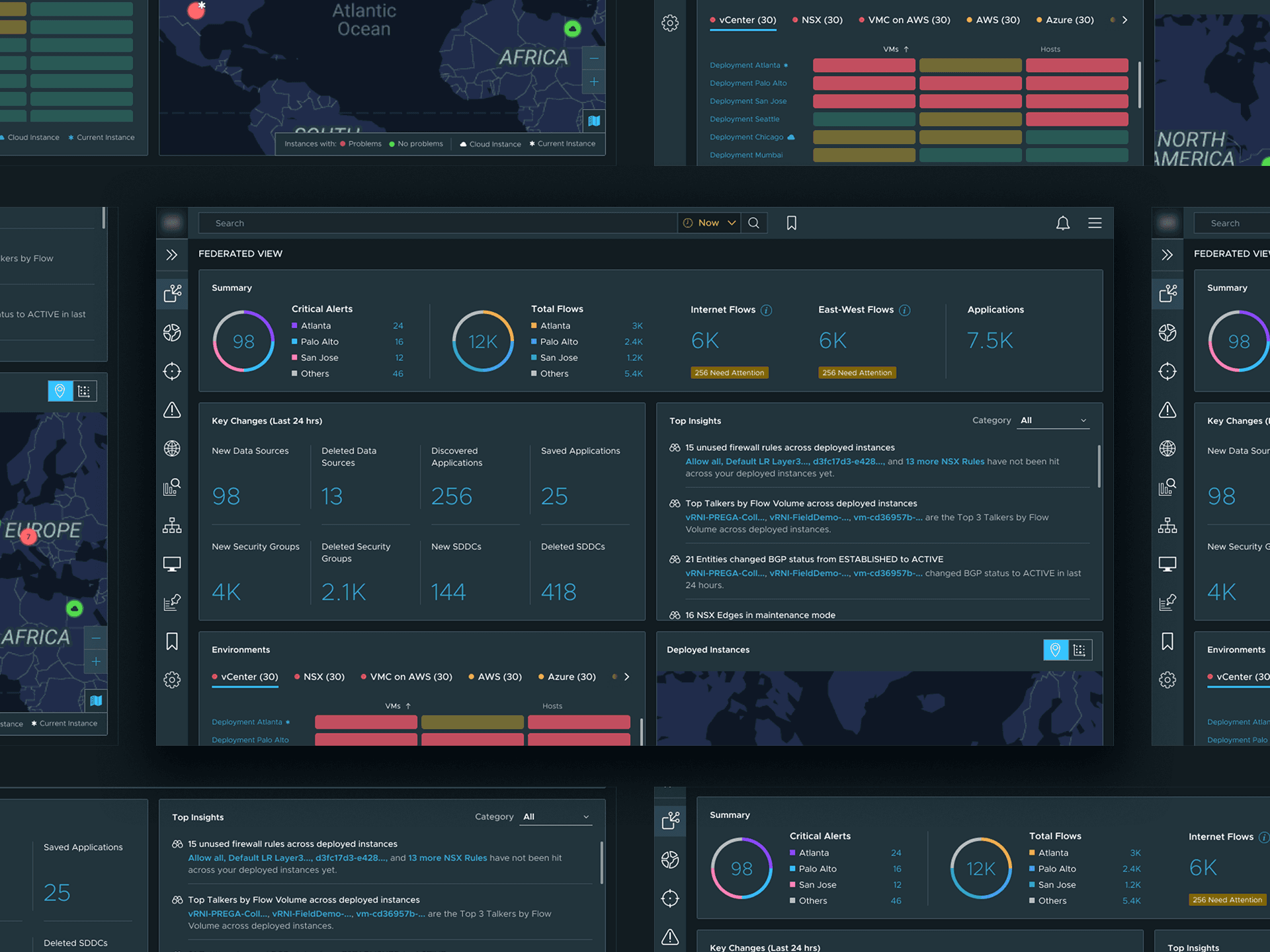
When VMware introduced network federation and a new pooled licensing model, teams needed a quick way to understand what was happening across multiple deployed environments. I designed a dashboard that rolls up alerts, health, and flow signals into one view, with drill-downs and deep links into each instance for real troubleshooting.
Let's do some roleplay
You're a network admin at a company with offices in twelve countries. You're responsible for the health and security of everything running across your organization's virtual infrastructure. Just business as usual.
So you log into an instance of VMware's network insight tool. You check the environments. You check the alerts. You check the flows. You move on.
You log into the next instance. Check the environments. Check the alerts. Check the flows.
You log into the next instance. Check the environments. Check the alerts. Check the flows.
You log into the next instance. Check the environments. Check the alerts. Check the flows.
You log into the next instance…
Log in

cloud.vmware.com

Let's do some roleplay
You're a network admin at a company with offices in twelve countries. You're responsible for the health and security of everything running across your organization's virtual infrastructure. Just business as usual.
So you log into an instance of VMware's network insight tool. You check the environments. You check the alerts. You check the flows. You move on.
You log into the next instance. Check the environments. Check the alerts. Check the flows.
You log into the next instance. Check the environments. Check the alerts. Check the flows.
You log into the next instance. Check the environments. Check the alerts. Check the flows.
You log into the next instance…

Fifty instances across twelve countries. Each one monitoring several environments — vCenters, NSX deployments, AWS accounts, Azure subscriptions, physical devices, and more. Each environment running hundreds of nodes and hosts. Each generating alerts, warnings, critical problems. Data flows across all of it numbering in the thousands. Open problems reaching into the hundreds of thousands.
Oh, and nothing holds still. Every 24 hours, hundreds of data sources appear and hundreds vanish. Applications spin up and get torn down. Security groups churn by the thousands. That tab you checked twenty minutes ago? Already stale.
Everything was doing a lot of heavy lifting. You're trying to reconstruct a globe from fragments, one tab at a time.
You log into the next instance. Just business as usual.
One dashboard to rule them all
VMware's vRealize Network Insight let enterprises monitor and troubleshoot their virtual network infrastructure. Per instance, it worked well. The problem was that enterprises don't operate per instance. They operate across dozens or hundreds of them, and vRNI had no way to connect the dots.
In 2021, VMware set out to build federation: a system that links isolated vRNI instances and surfaces a single, aggregated view of an enterprise's entire network infrastructure. Health, alerts, flows, problems — all of it, across every instance, in one place.
Nothing like this existed in the product. PMs had mapped the technical architecture in concept models. Engineering had scoped feasibility. The open question was the experience itself: what does this dashboard show you? How does it behave? What do you see first?
Problem
This page is basically a wrapper around one Figma file. If you scroll, you’ll find the full case study in its natural habitat, complete with interactions and details I probably didn’t need to include but did anyway.
Impact
A pretty card is irrelevant if it doesn’t change behavior. In our pilot and rollout, the framework consistently turned curiosity into real feature launches and repeat usage.
25%
click through rate
1 in 4 people tried a featured capability.
40%
of Designer launches
Nearly half of Designer opens in the pilot.
+500%
avg. MAU lift
Sharp increase of usage for promoted flows.
A small lesson I keep reusing
Discovery only works when it feels earned. This project was a reminder that the best growth surfaces are the ones that avoid 'marketing' and feel natural within the product.