Relevant home pages
Redesigning what 128 million people see when they open Microsoft 365 Mobile.
role
Product Designer
responsibilities
Full Redesign + Design System
timeline
5 months
collaborators
Design Team of 3, Multiple Product Leads, Engineering Leads, Content Design, QA
tl;dr
M365 Mobile had 128M monthly users but only 24M daily ones. The home page showed files you had already opened, useful once a month and forgettable otherwise.
We redesigned it around what you need next, and four million more people started opening the app every day.
Relevant home pages
Redesigning what 128 million people see when they open Microsoft 365 Mobile.
role
Product Designer
responsibilities
Full Redesign + Design System
timeline
5 months
collaborators
Design Team of 3, Multiple Product Leads, Engineering Leads, Content Design, QA
tl;dr
M365 Mobile had 128M monthly users but only 24M daily ones. The home page showed files you had already opened, useful once a month and forgettable otherwise.
We redesigned it around what you need next, and four million more people started opening the app every day.
Relevant home pages
Redesigning what 128 million people see when they open Microsoft 365 Mobile.
role
Product Designer
responsibilities
Full Redesign + Design System
timeline
5 months
collaborators
Design Team of 3, Multiple Product Leads, Engineering Leads, Content Design, QA
tl;dr
M365 Mobile had 128M monthly users but only 24M daily ones. The home page showed files you had already opened, useful once a month and forgettable otherwise.
We redesigned it around what you need next, and four million more people started opening the app every day.

128 million people
That's how many people used M365 Mobile every month.
However, this came with a caveat: only 24 million opened it daily.
"Only" 24 million daily
"Only" 24 million daily
128 million monthly
128 million people
That's how many people used M365 Mobile every month.
However, this came with a caveat: only 24 million opened it daily.
"Only" 24 million daily
128 million monthly
Newspaper, not a magazine
The home page was the face of the app. If it didn't give you a reason to come back tomorrow, nothing else mattered.
Microsoft leadership wanted M365 Mobile to become some thing users opened every day.

Newspaper, not a magazine
The home page was the face of the app. If it didn't give you a reason to come back tomorrow, nothing else mattered.
Microsoft leadership wanted M365 Mobile to become some thing users opened every day.
Where it all began
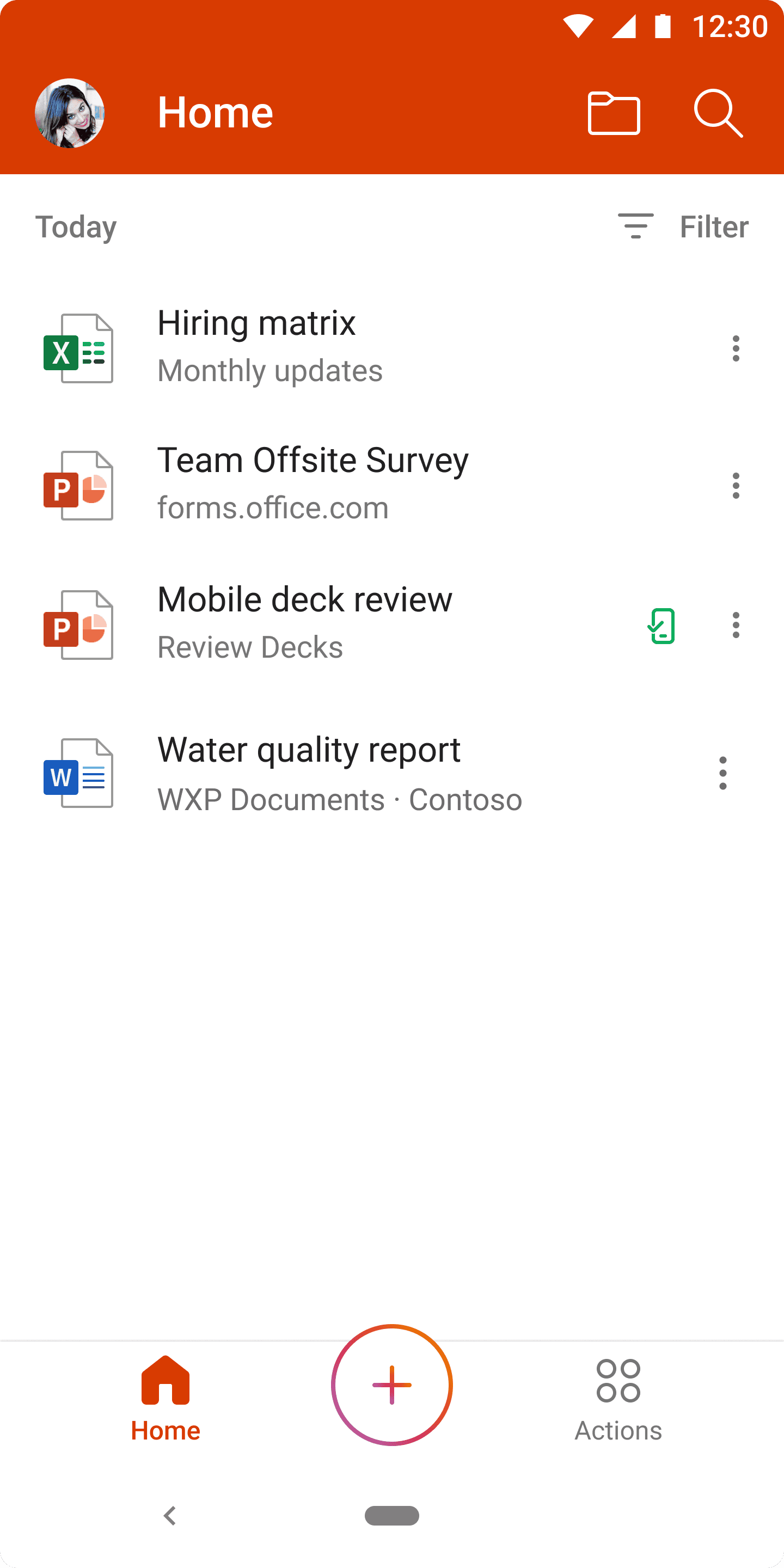
Office Mobile (as it was originally called) released in 2019, as a single consolidated view of your Word, Excel, and PowerPoint files.
Where it all began
Office Mobile (as it was originally called) released in 2019, as a single consolidated view of your Word, Excel, and PowerPoint files.
Then it kept expanding.
And it kept expanding.
PDFs. Scanned documents. Forms. Videos. Voice notes. Notes. Designer. Tasks. Loop.












Then it kept expanding.
And it kept expanding.
PDFs. Scanned documents. Forms. Videos. Voice notes. Notes. Designer. Tasks. Loop.
Attempts to organize were made
Before this project (and my involvement), there were various attempts to fix this mess.
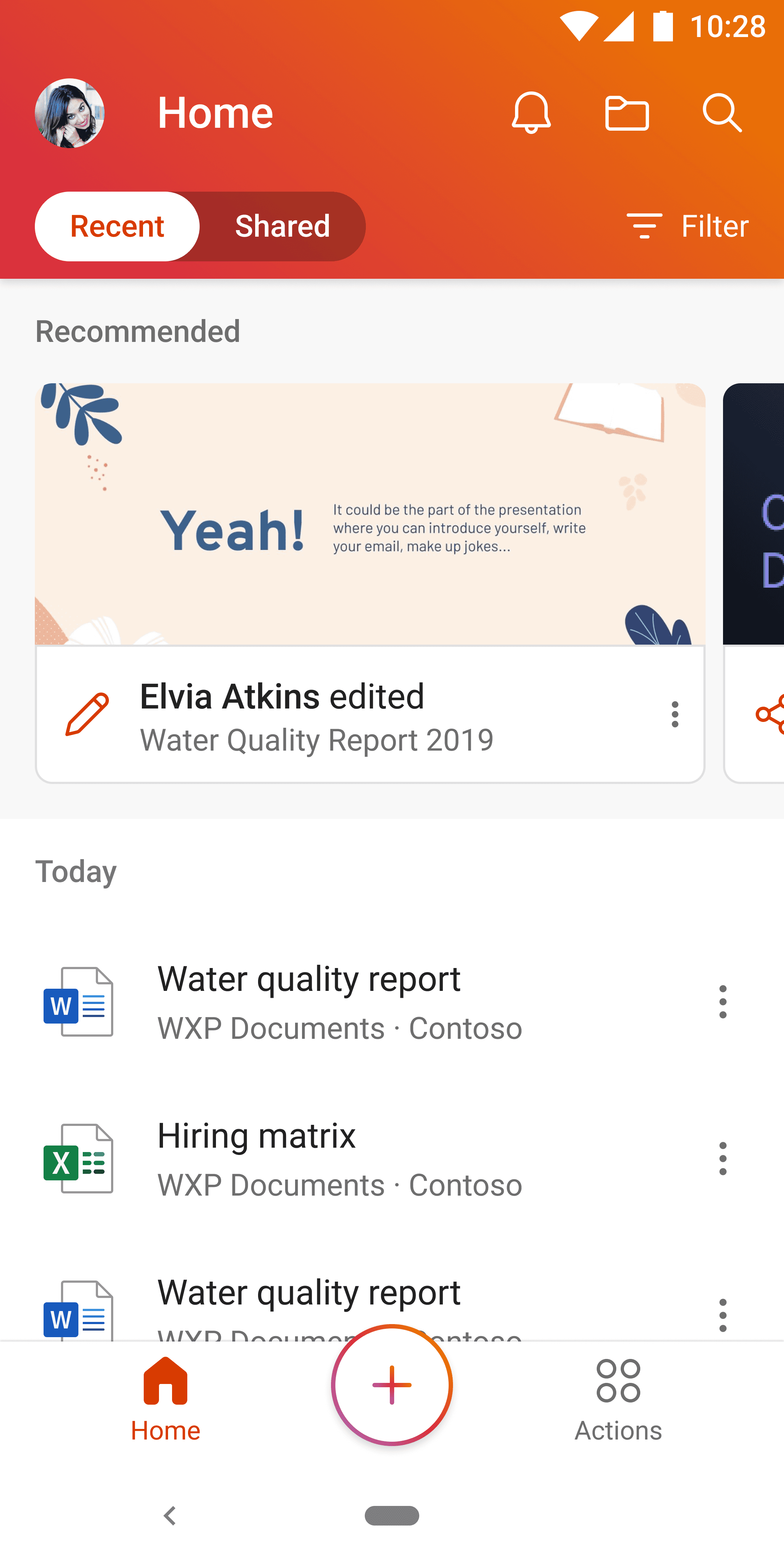
First: a toggle between "recent" and "shared" along with the "recommended" section.
Attempts to organize were made
Before this project (and my involvement), there were various attempts to fix this mess.
First: a toggle between "recent" and "shared" along with the "recommended" section.
Then the next,
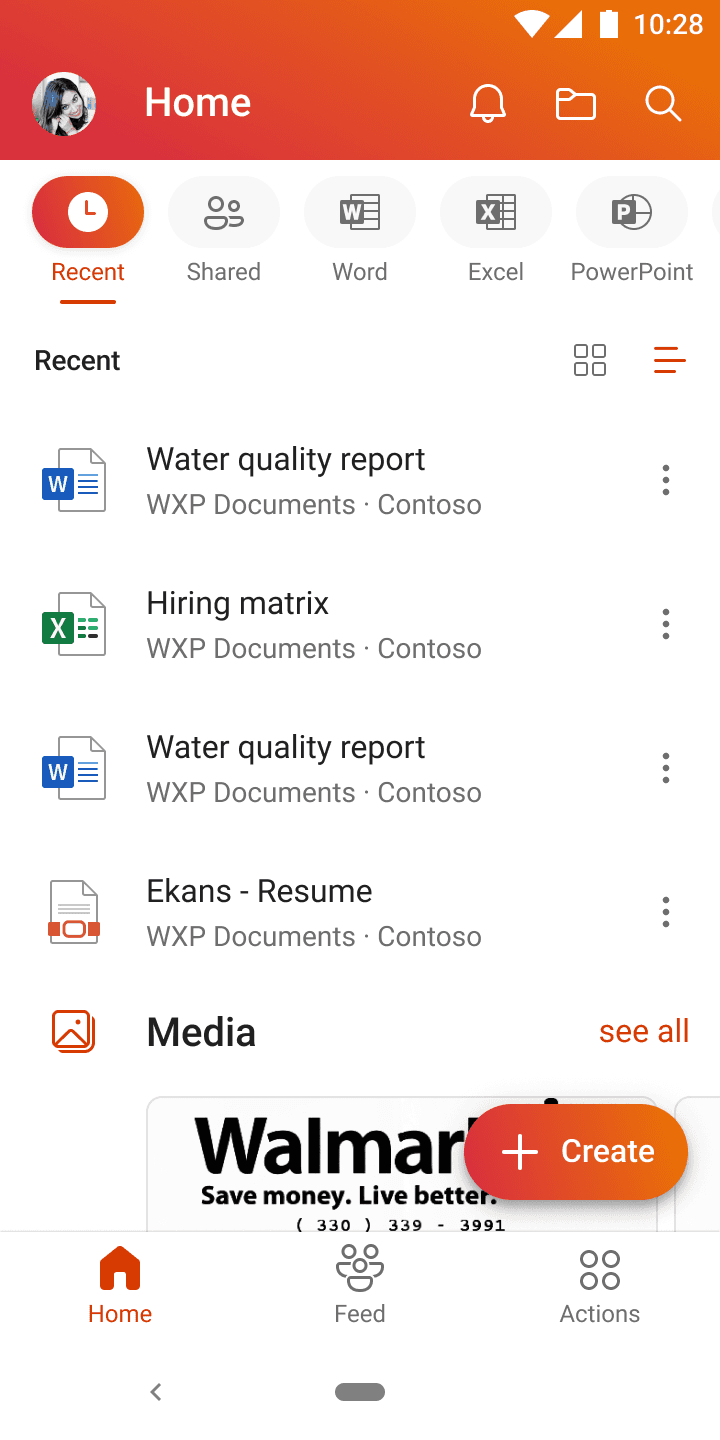
The Quick Action Bar (QAB), a customizable horizontal tab bar, was launched to try and categorize and filter your list.
However, this pattern didn't scale, buckling under every new content type added within the app.
Users never ended up configuring the slots or picked their own tabs. They parked on the default and stayed there.
Then the next,
The Quick Action Bar (QAB), a customizable horizontal tab bar, was launched to try and categorize and filter your list.
However, this pattern didn't scale, buckling under every new content type added within the app.
Users never ended up configuring the slots or picked their own tabs. They parked on the default and stayed there.
Content relevance was the real problem
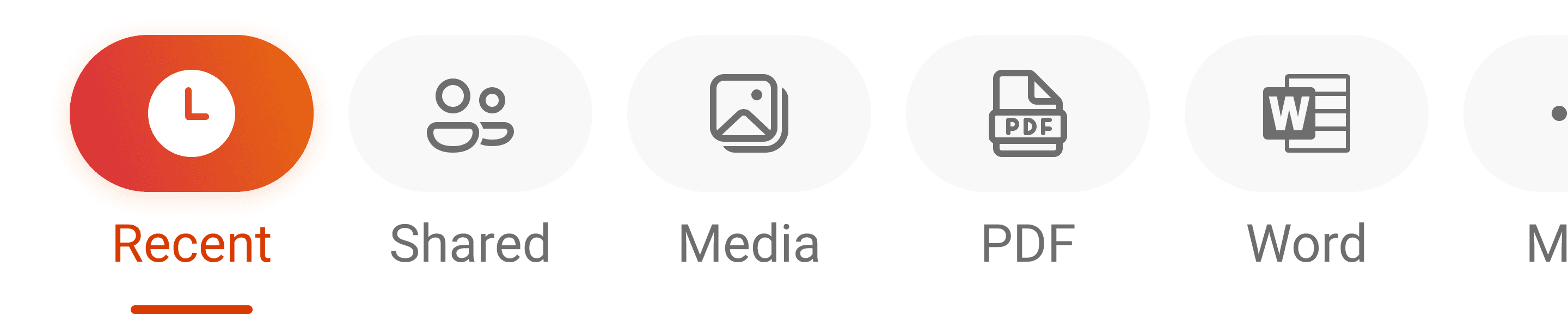
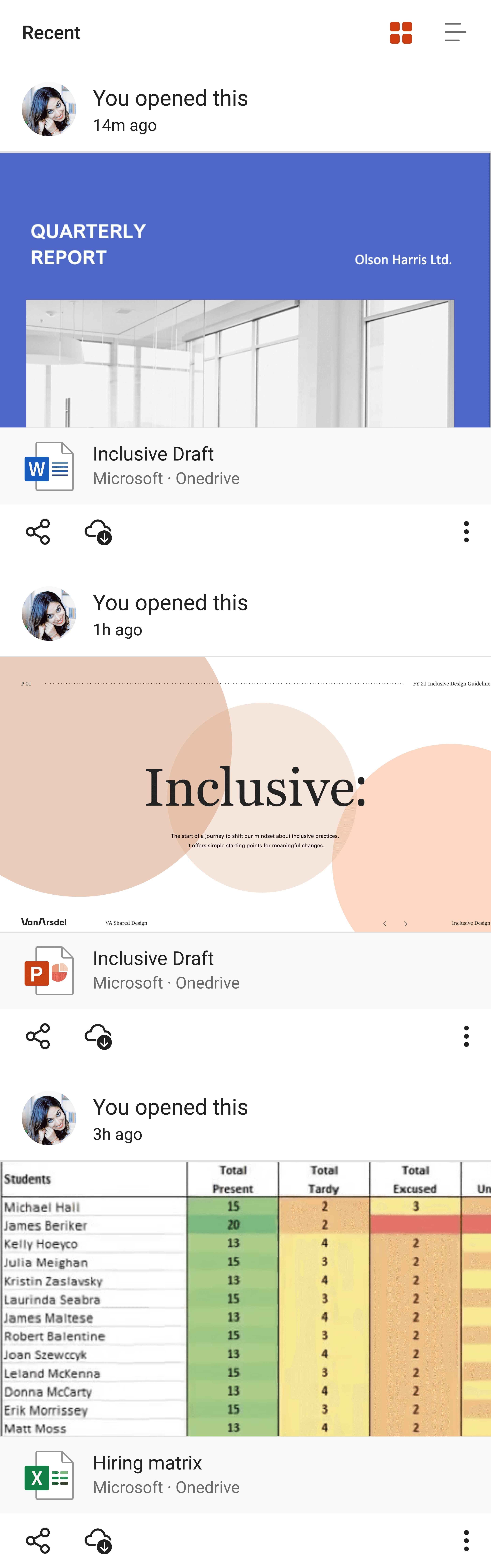
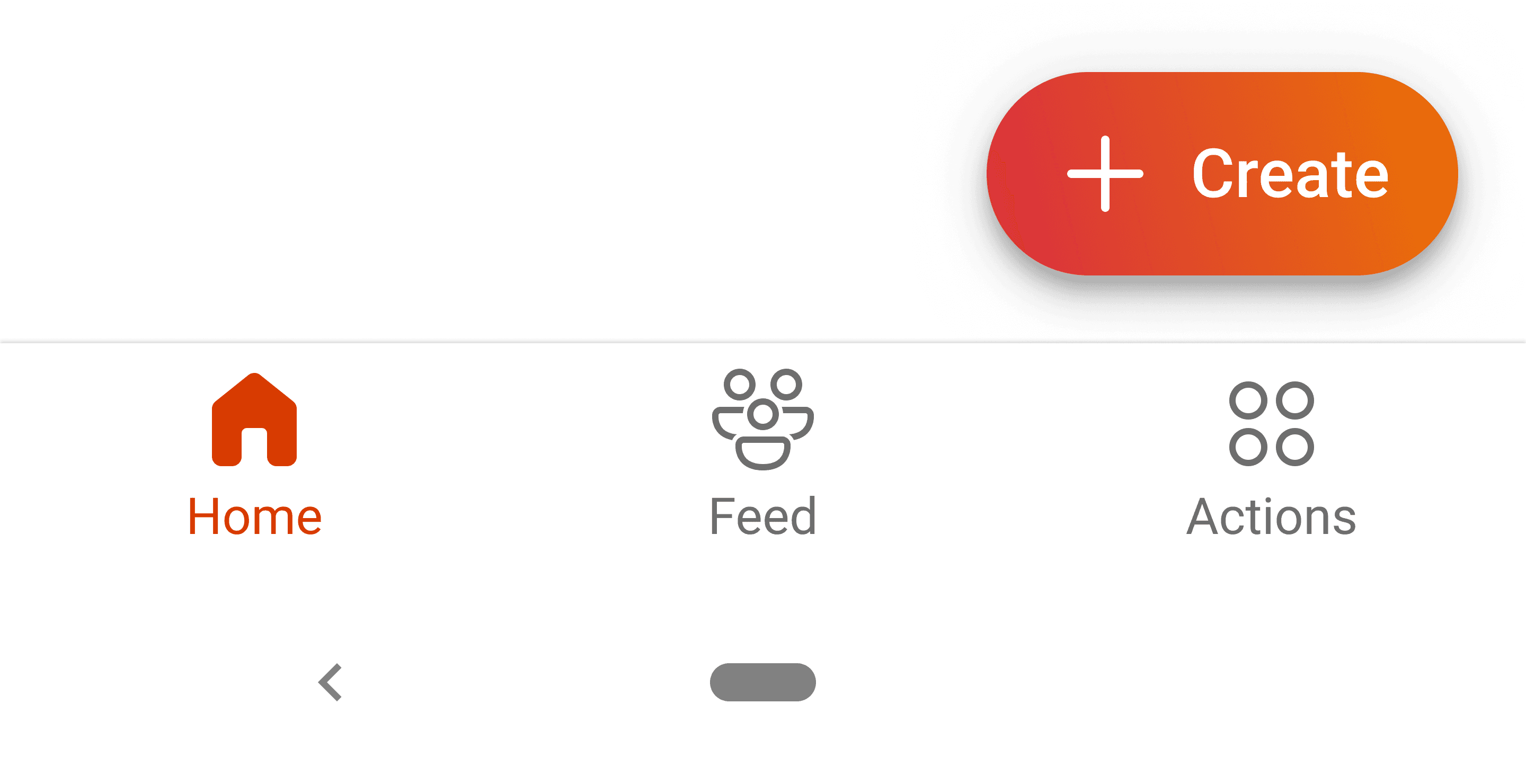
The default view — "recently opened" — was the unseen contributor to this mess. Especially in the newly introduced card view.
If you just had a document open on your laptop, that was the first thing you saw on your phone. You were just looking at it. You already knew what's in it.
The content model was wrong. No UI on top was going to fix that.


Content relevance was the real problem
The default view — "recently opened" — was the unseen contributor to this mess. Especially in the newly introduced card view.
If you just had a document open on your laptop, that was the first thing you saw on your phone. You were just looking at it. You already knew what's in it.
The content model was wrong. No UI on top was going to fix that.
What people actually needed
We talked to users. Three patterns came back:
We took the first two
Search was owned by another team with a years-long roadmap. We needed to ship in months.
We scoped deliberately. Fuzzy recall would come next.
"I need the files that matter right now."

Kayo Miwa
Busy PM
"I know where my file is. Let me get there."

David Power
Grumpy Manager
"I can picture the file, but I can't remember its name."

Aadi Kapoor
Lost Intern
We took the first two
Search was owned by another team with a years-long roadmap. We needed to ship in months.
We scoped deliberately. Fuzzy recall would come next.
What people actually needed
We talked to users. Three patterns came back:
We took the first two
Search was owned by another team with a years-long roadmap. We needed to ship in months.
We scoped deliberately. Fuzzy recall would come next.
"I need the files that matter right now."
Kayo Miwa
Busy PM
"I know where my file is. Let me get there."
David Power
Grumpy Manager
"I can picture the file, but I can't remember its name."
Aadi Kapoor
Lost Intern
We took the first two
Search was owned by another team with a years-long roadmap. We needed to ship in months.
We scoped deliberately. Fuzzy recall would come next.
And we rebuilt the home page
And we rebuilt the home page
Tab 1: For you
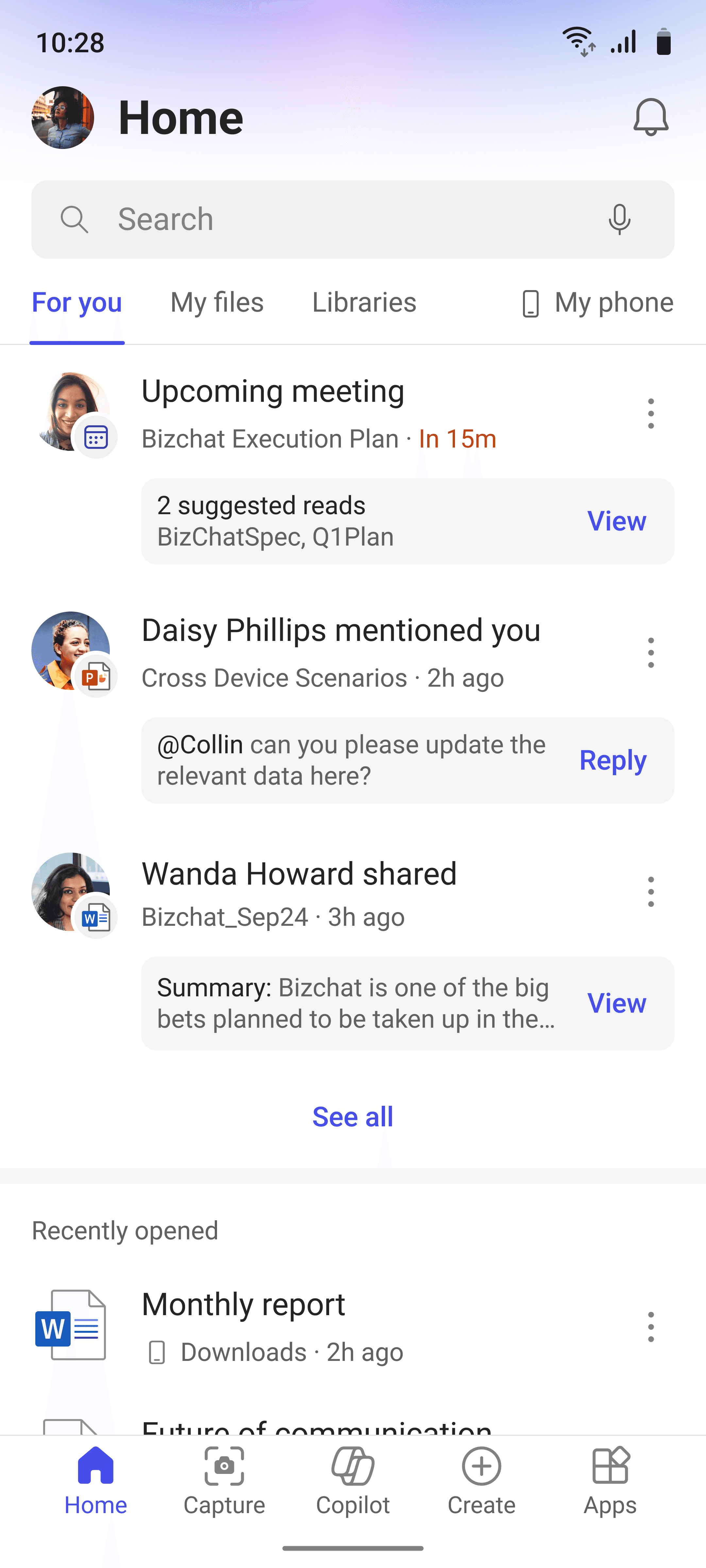
What needs your attention now.
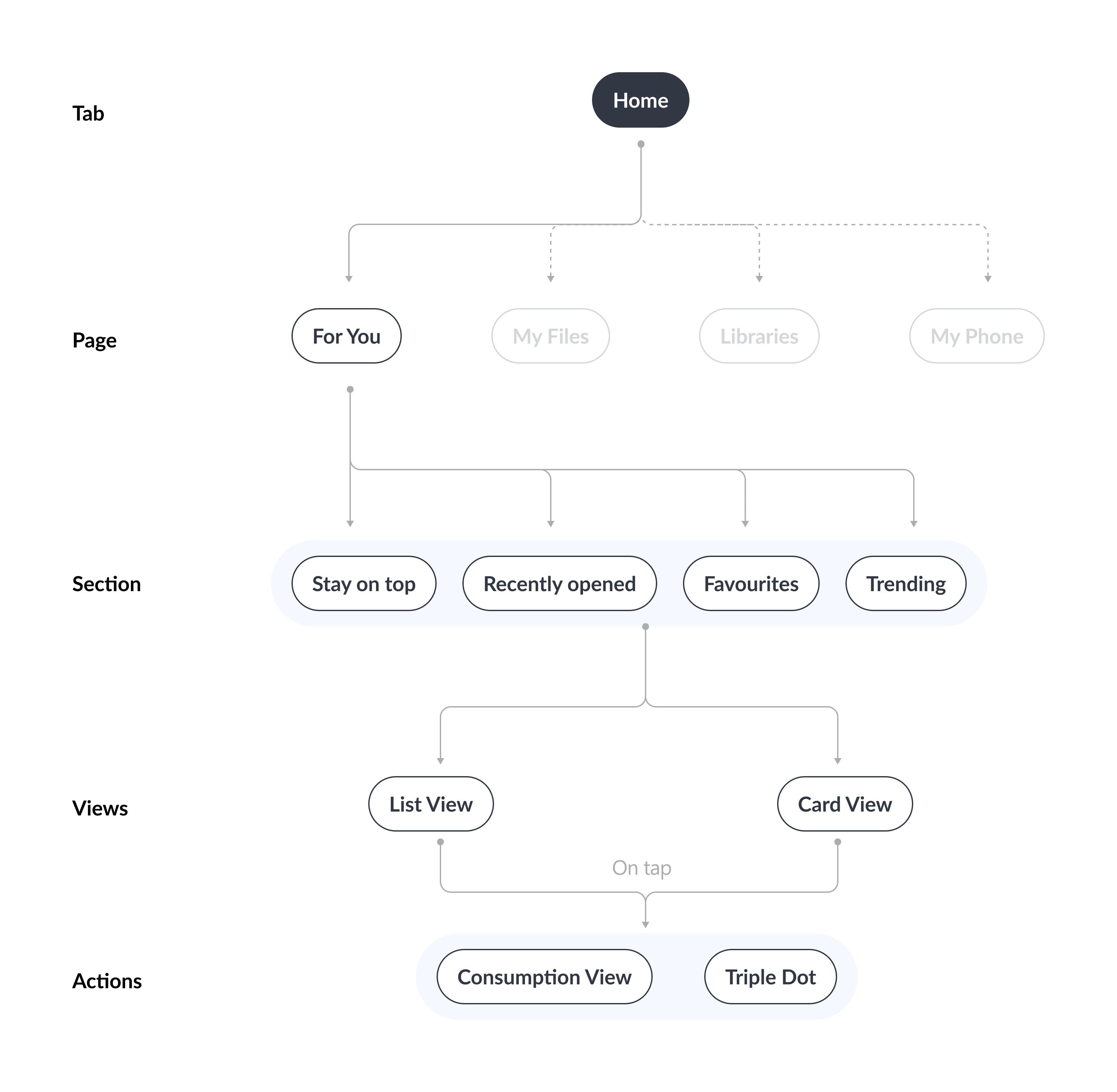
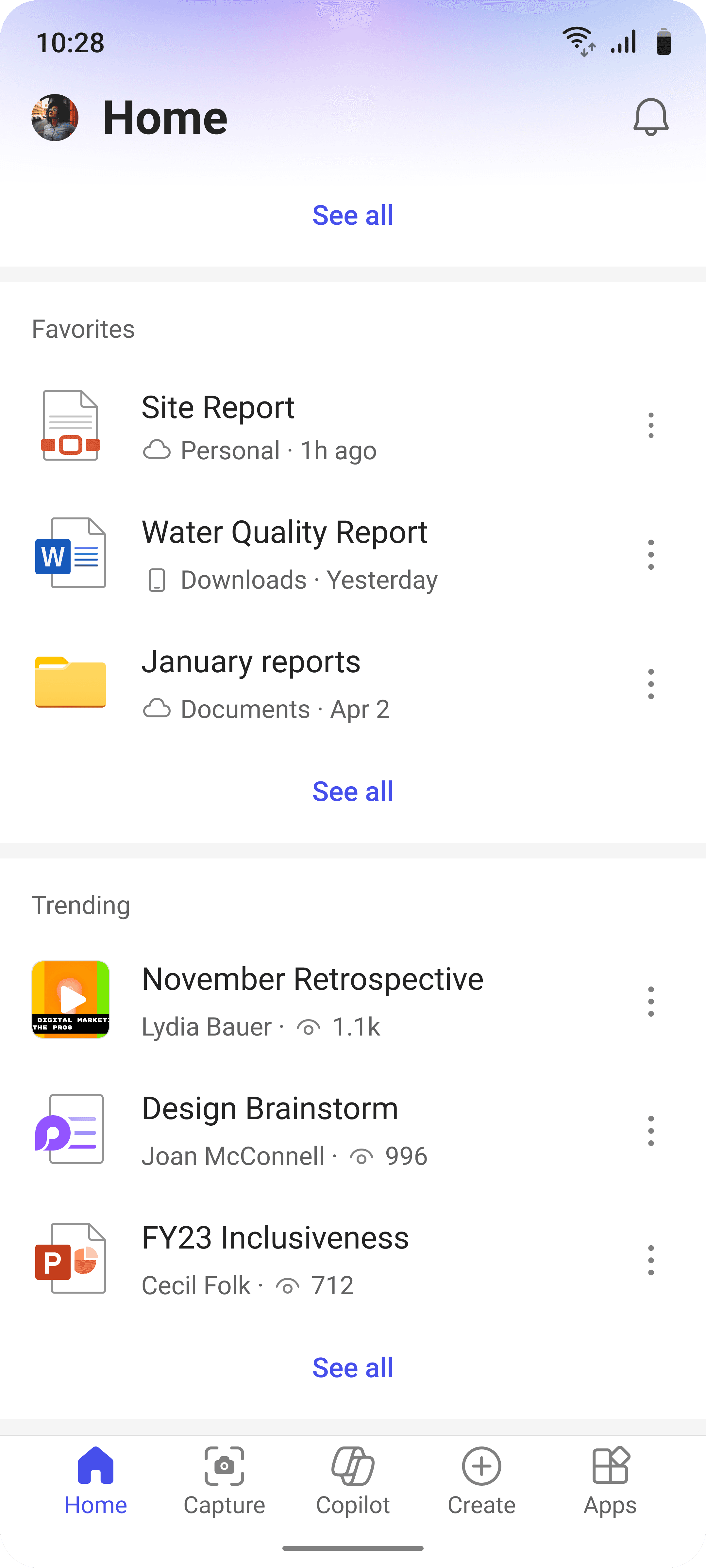
The app triages for you. The files that you need now sit at the top. Below that: recently opened, favorites, and files trending in your organization.
The order is the design decision. What you need comes before what you touched last.
The app triages for you. The files that you need now sit at the top. Below that: recently opened, favorites, and files trending in your organization.
The order is the design decision. What you need comes before what you touched last.
Tab 1: For you
What needs your attention now.
The app triages for you. The files that you need now sit at the top. Below that: recently opened, favorites, and files trending in your organization.
The order is the design decision. What you need comes before what you touched last.

Tab 2: My files
Your entire OneDrive, browsable
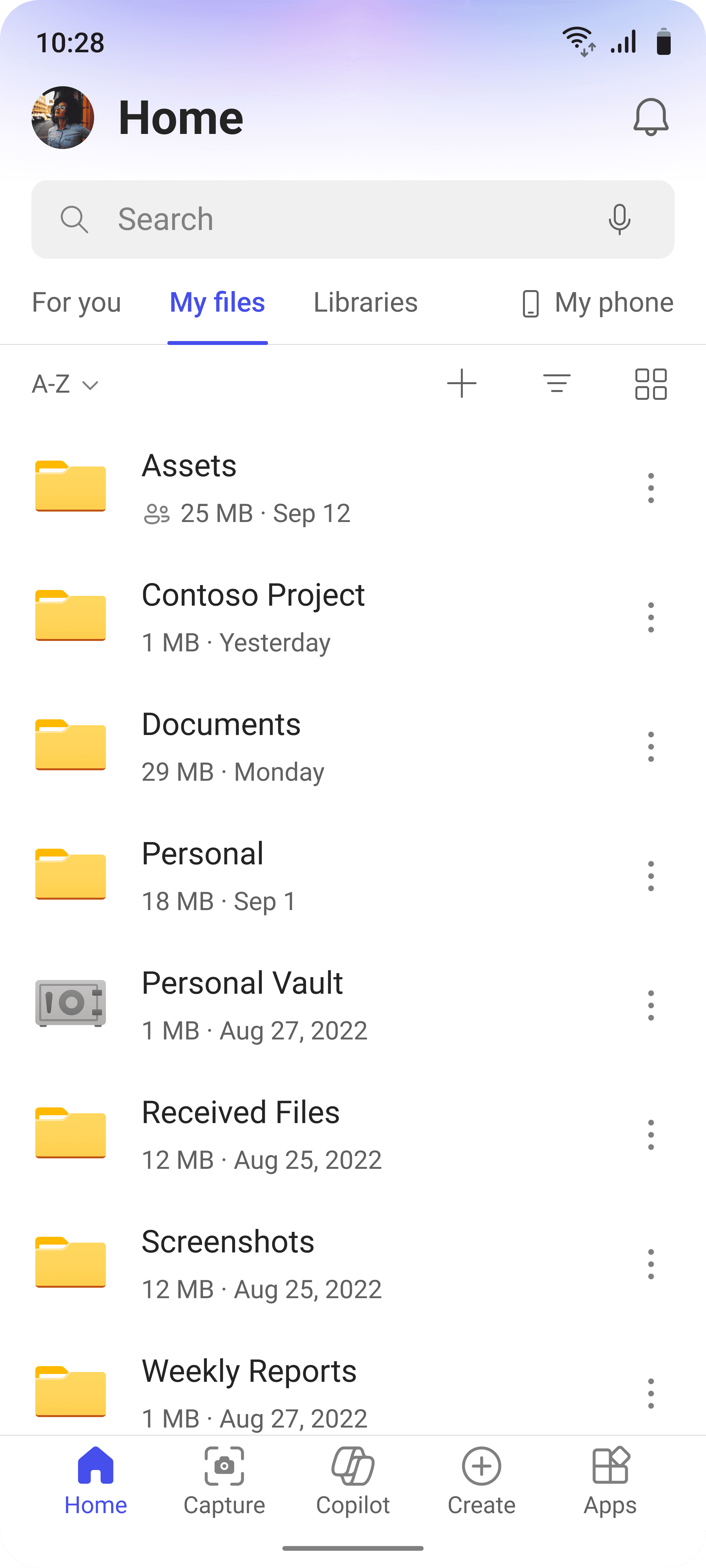
The app didn't let you browse your own cloud storage. My Files fixed that. Full OneDrive directory, same structure as desktop.
The answer to "I know where it is, just let me get there."
The app didn’t let you browse your own cloud storage. My Files fixed that. Full OneDrive directory, same structure as desktop.
The answer to “I know where it is, just let me get there.”
Tab 2: My files
Your entire OneDrive, browsable
The app didn't let you browse your own cloud storage. My Files fixed that. Full OneDrive directory, same structure as desktop.
The answer to "I know where it is, just let me get there."
Tab 3: Libraries
Every SharePoint library you can access.
The same browsing gap applied to SharePoint. Users who worked across team sites had no mobile entry point.
This tab surfaced every library the user had access to — flattening an organizational structure that was otherwise invisible on mobile.
The same browsing gap applied to SharePoint. Users who worked across team sites had no mobile entry point.
This tab surfaced every library the user had access to — flattening an organizational structure that was otherwise invisible on mobile.


Tab 3: Libraries
Every SharePoint library you can access.
The same browsing gap applied to SharePoint. Users who worked across team sites had no mobile entry point.
This tab surfaced every library the user had access to — flattening an organizational structure that was otherwise invisible on mobile.

Tab 4: My phone
Offline files and local device storage.
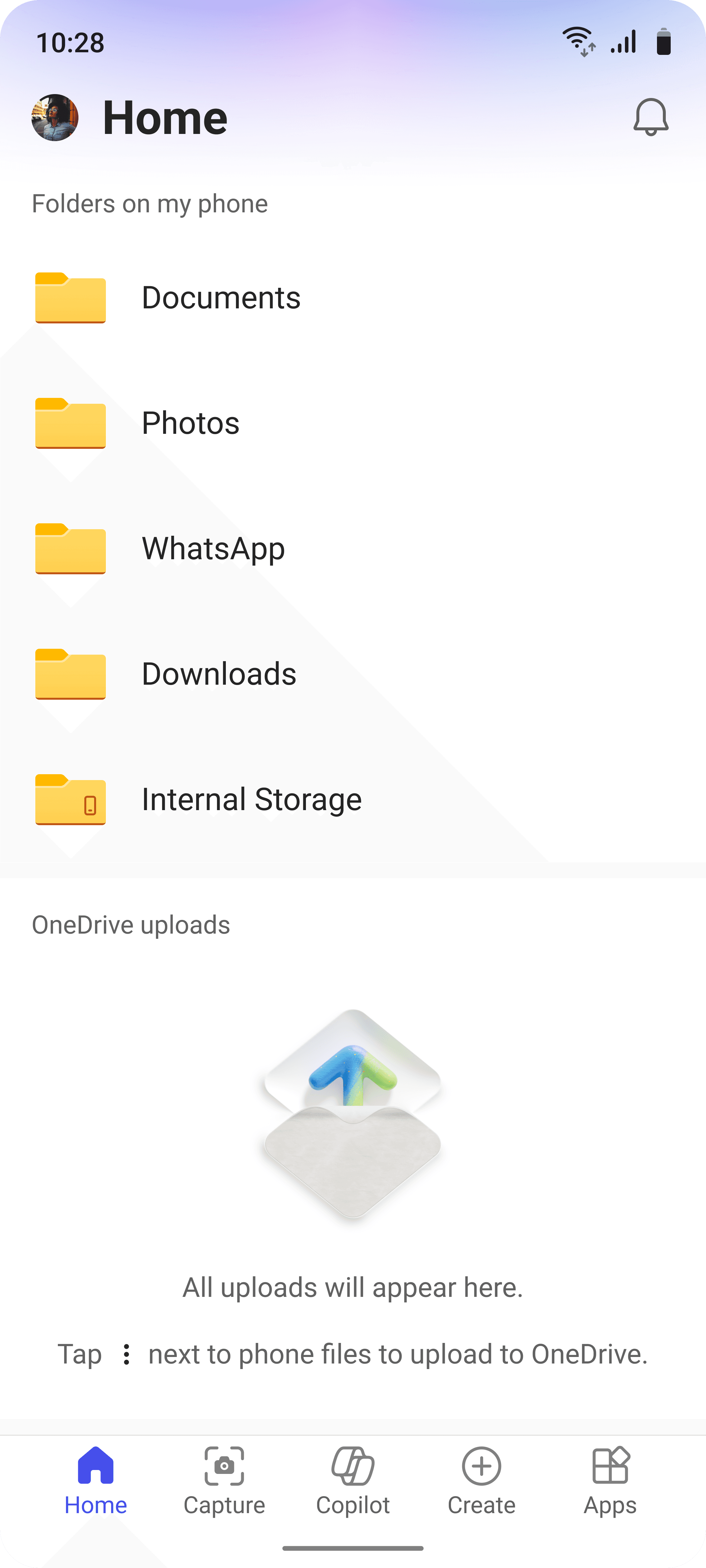
Saved-for-offline files, a local file browser and ongoing uploads were all previously buried under obscure scenarios.
My Phone gave them a dedicated surface.
Saved-for-offline files, a local file browser and ongoing uploads were all previously buried under obscure scenarios.
My Phone gave them a dedicated surface.
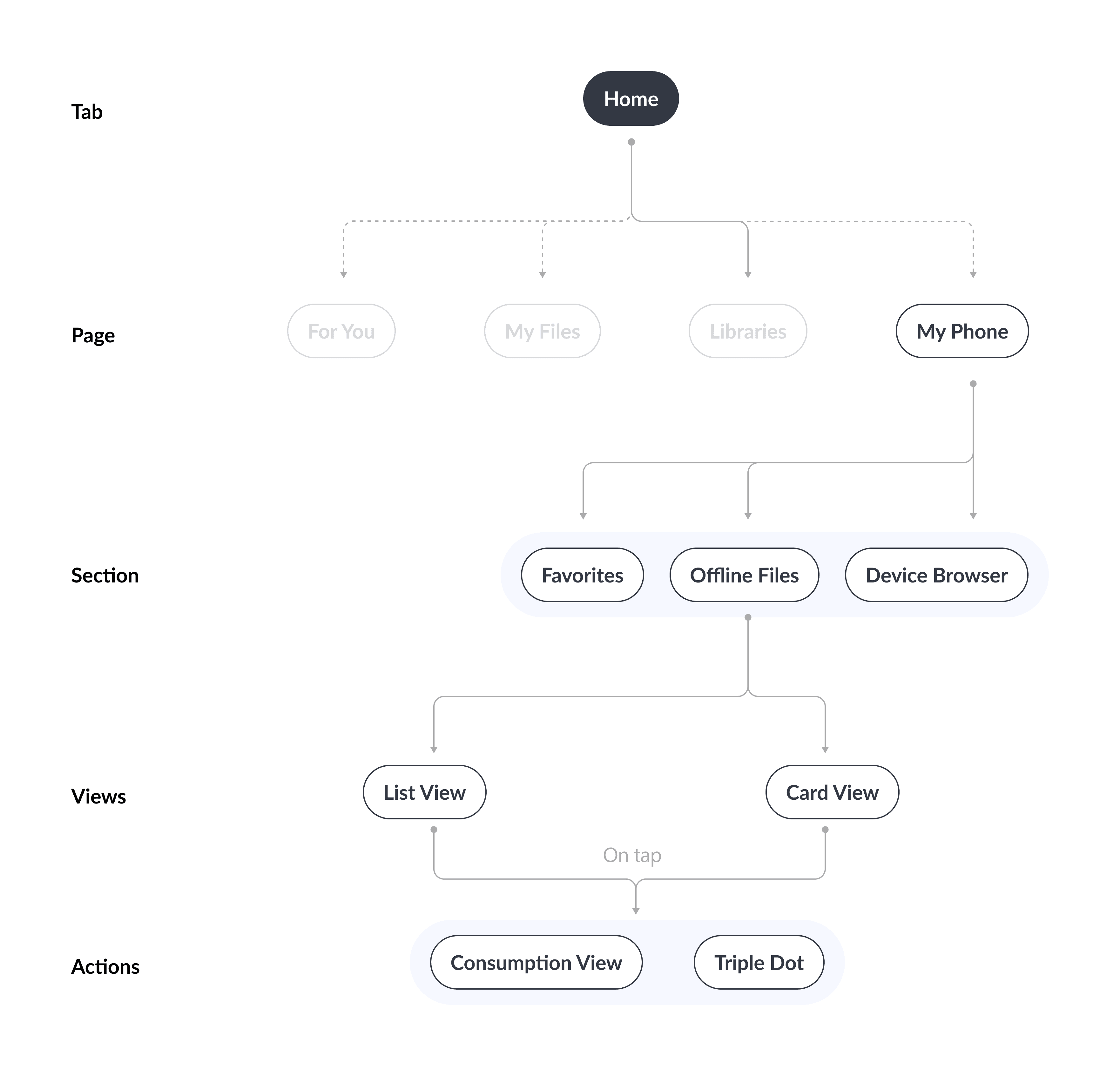
Tab 4: My phone
Offline files and local device storage.
Saved-for-offline files, a local file browser and ongoing uploads were all previously buried under obscure scenarios.
My Phone gave them a dedicated surface.
Redefining "relevant"
The old "recommended" section showed you pretty much any signal that it could capture. This was impersonal, and often annoying.
Working with PMs over several months, we defined which signals from Microsoft Graph actually indicated "you should look at this."

Redefining "relevant"
The old "recommended" section showed you pretty much any signal that it could capture. This was impersonal, and often annoying.
Working with PMs over several months, we defined which signals from Microsoft Graph actually indicated "you should look at this."
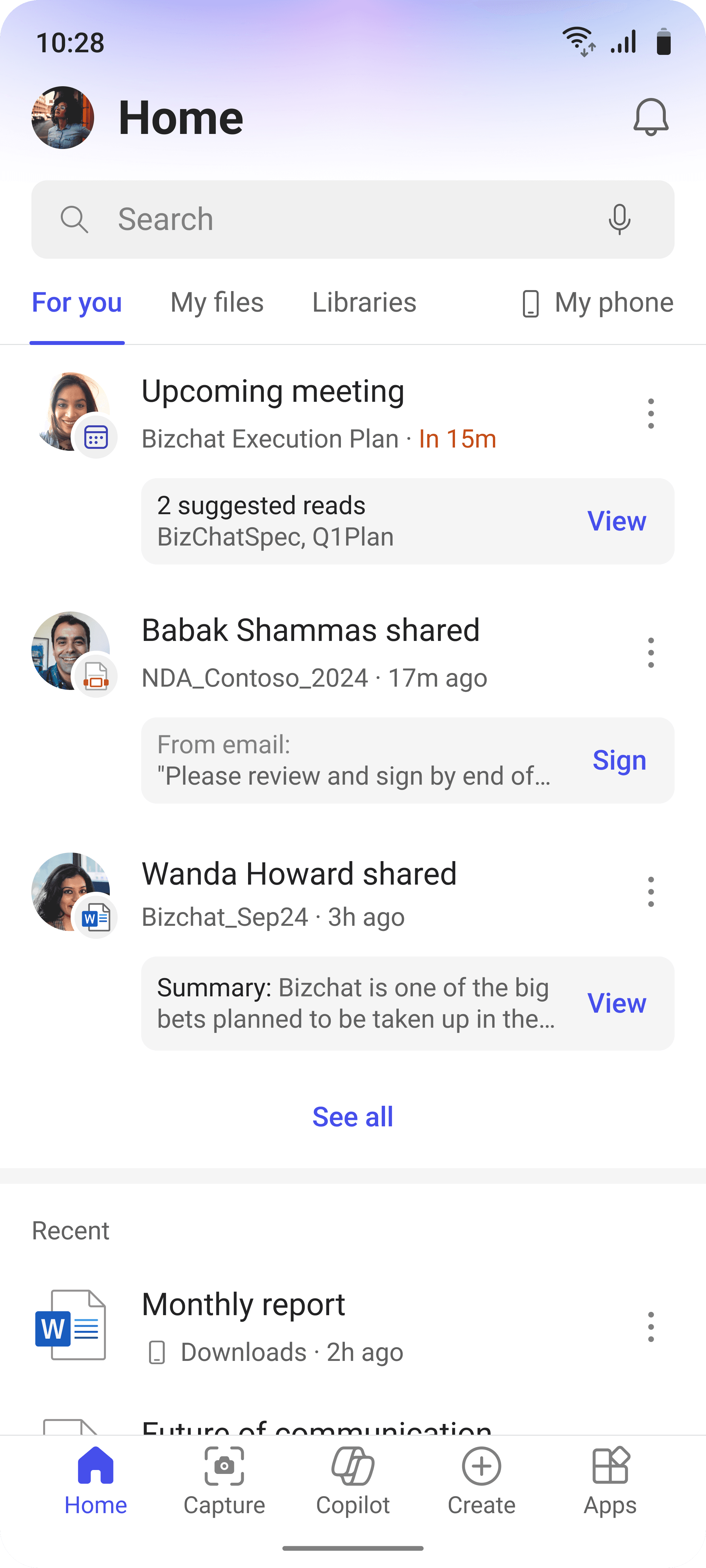
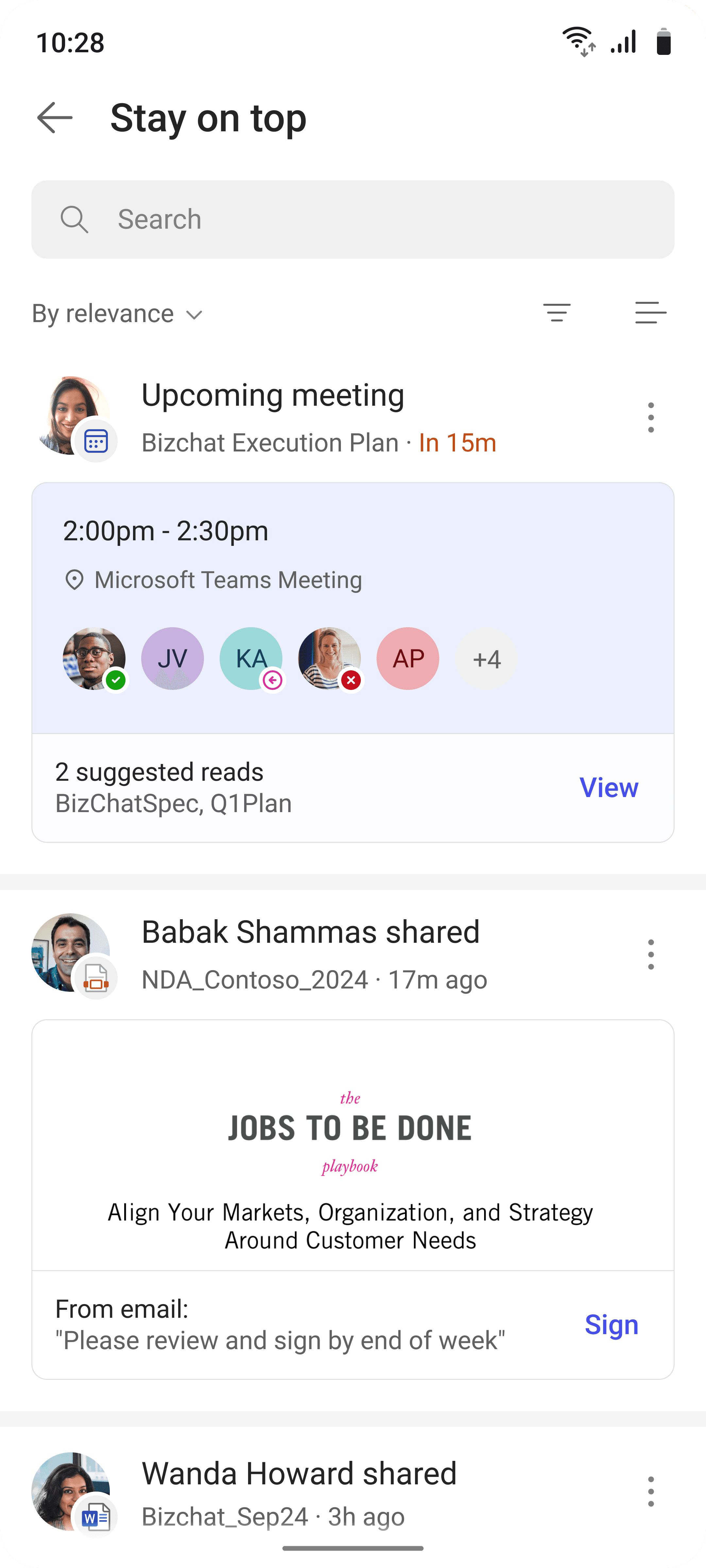
Stay on top
Recently opened
My files
Stay on top
Recently opened
My files
Learn one view,
understand all of them
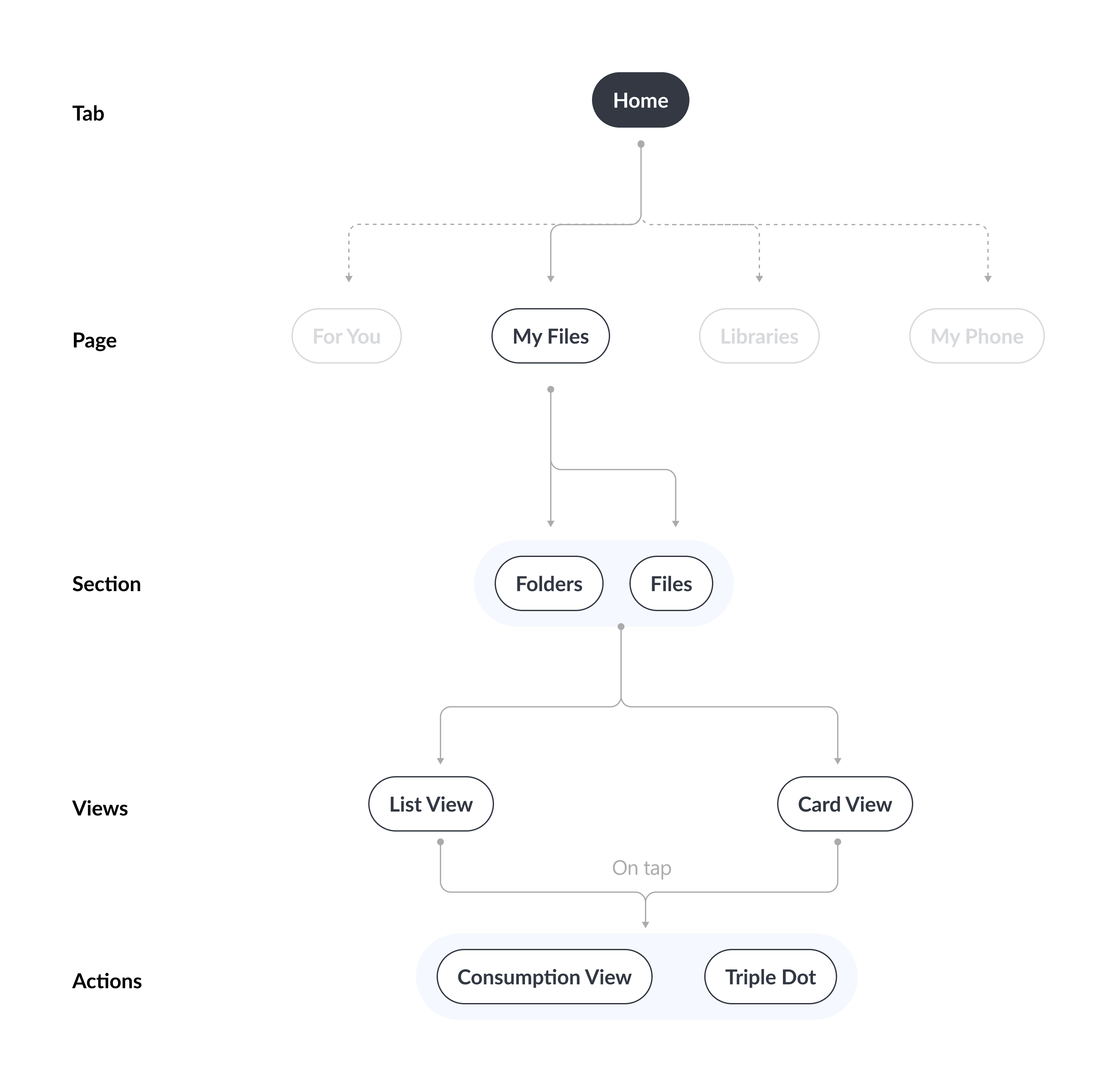
Every tab follows the same model. Home page shows a preview. Tap through to the full list.
List view is enabled by default for scanning. Card view is available on toggle for recognition.
Card views adapt to context. And every page shares controls: sort, filter, change view.
Stay on top
Recently opened
My files
Learn one view,
understand all of them
Every tab follows the same model. Home page shows a preview. Tap through to the full list.
List view is enabled by default for scanning. Card view is available on toggle for recognition.
Card views adapt to context. And every page shares controls: sort, filter, change view.
Same file, different stories
The same files appear across the app in seven different states. Each one shows different metadata because the context changes what you need to know.
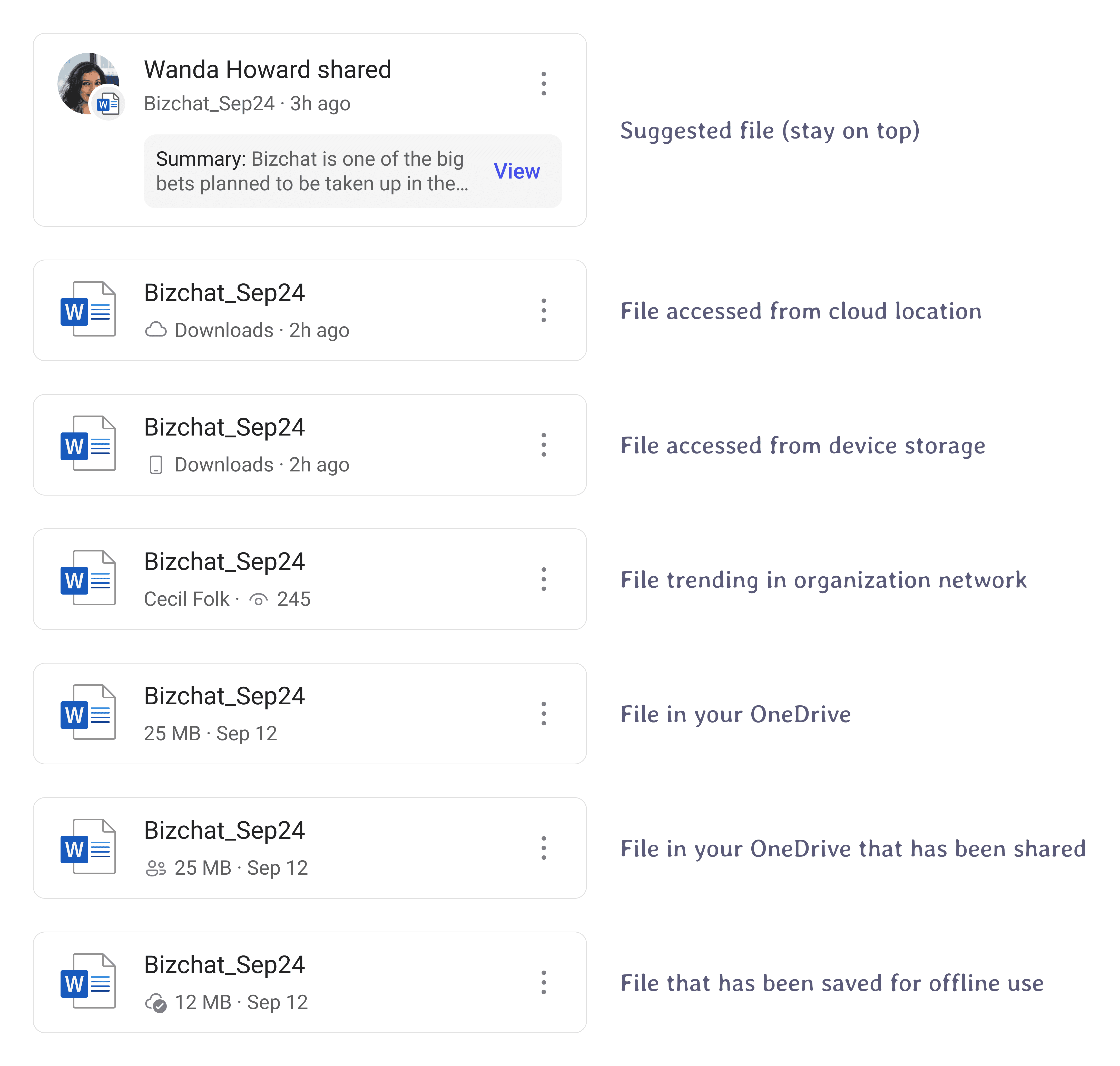
Same file, different stories
The same files appear across the app in seven different states. Each one shows different metadata because the context changes what you need to know.
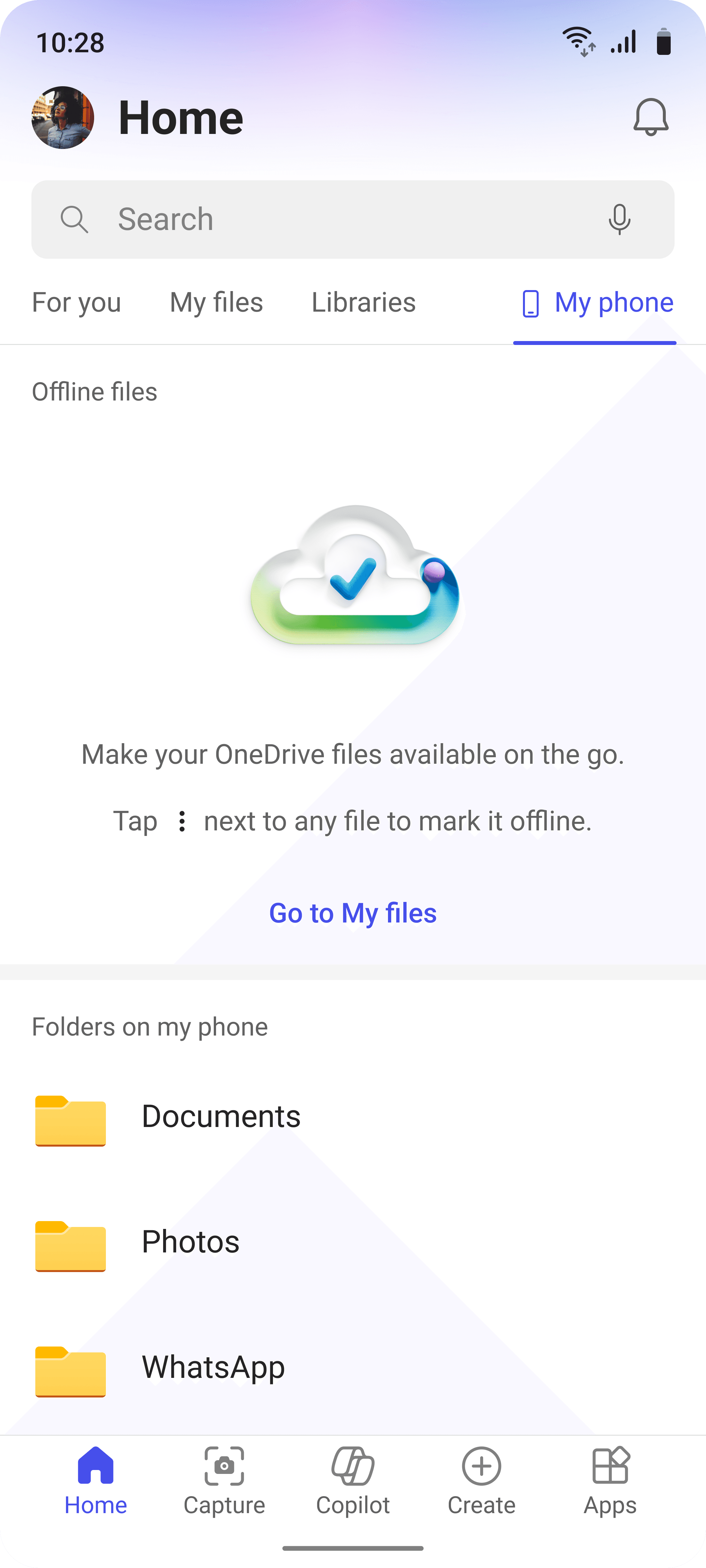
Empty states? Glass half full
Old empty states were blank screens. We made them starting points.
No files? Here's how to open one. No offline saves? Here's why you'd want them.
One question answered every time: what do I do here?
Empty states? Glass half full
Old empty states were blank screens. We made them starting points.
No files? Here's how to open one. No offline saves? Here's why you'd want them.
One question answered every time: what do I do here?
Impact
Four million more people found a reason to open the app every day.
28m
daily active users
A 16.66% increase from 24m.
130m
monthly active users
A small but significant 1.5% bump.
+13%
M1 retention
Relative to previous levels.
Impact
Four million more people found a reason to open the app every day.
28m
daily active users
A 16.66% increase from 24m.
130m
monthly active users
A small but significant 1.5% bump.
+13%
M1 retention
Relative to previous levels.
Impact
Four million more people found a reason to open the app every day.
28m
daily active users
A 16.66% increase from 24m.
130m
monthly active users
A small but significant 1.5% bump.
+13%
M1 retention
Relative to previous levels.
The team
No project of such scale can be tackled alone. I am immensely grateful to our small but mighty team. Through sleepless nights, we coordinated with multiple PMs per feature area, three engineering leads, and survived countless reviews.
My primary responsibility were the features under the tabs For You, My Phone and building and maintaining the design system.



The team
No project of such scale can be tackled alone. I am immensely grateful to our small but mighty team. Through sleepless nights, we coordinated with multiple PMs per feature area, three engineering leads, and survived countless reviews.
My primary responsibility were the features under the tabs For You, My Phone and building and maintaining the design system.
The team
No project of such scale can be tackled alone. I am immensely grateful to our small but mighty team. Through sleepless nights, we coordinated with multiple PMs per feature area, three engineering leads, and survived countless reviews.
My primary responsibility were the features under the tabs For You, My Phone and building and maintaining the design system.
Looking back
This project taught me what it means to redesign the face of a product hundreds of millions of people already use. To introduce any new paradigm, you have to earn the trust of users who'd built years of muscle memory around it.
Building a custom design system on a five-month timeline forced a tradeoff I think about often. The existing Fluent design system couldn't do what we needed. The Fluent team moved at the pace of all of Microsoft — every component change had to account for every product surface across the ecosystem. We had five months and one app. So we built our own, shipped it, and aligned after. The lesson isn't "skip alignment." It's that waiting has a cost too, and sometimes catching up is cheaper than standing still.
Defining signal ranking against Microsoft Graph data changed how I think about relevance. The data was there. The hard part was deciding what mattered and in what order. We got it working, but I'd invest in precision testing earlier next time. Defining relevance is a design problem. Proving you defined it correctly is a measurement problem.
The constraint I still think about is the one we couldn't touch. We owned how people found their files. We didn't own what happened after they opened one. Editing, reading, and consumption belonged to other product teams. We could surface the right file faster than ever. Whether the experience on the other side matched was out of our hands.
Looking back
This project taught me what it means to redesign the face of a product hundreds of millions of people already use. To introduce any new paradigm, you have to earn the trust of users who'd built years of muscle memory around it.
Building a custom design system on a five-month timeline forced a tradeoff I think about often. The existing Fluent design system couldn't do what we needed. The Fluent team moved at the pace of all of Microsoft — every component change had to account for every product surface across the ecosystem. We had five months and one app. So we built our own, shipped it, and aligned after. The lesson isn't "skip alignment." It's that waiting has a cost too, and sometimes catching up is cheaper than standing still.
Defining signal ranking against Microsoft Graph data changed how I think about relevance. The data was there. The hard part was deciding what mattered and in what order. We got it working, but I'd invest in precision testing earlier next time. Defining relevance is a design problem. Proving you defined it correctly is a measurement problem.
The constraint I still think about is the one we couldn't touch. We owned how people found their files. We didn't own what happened after they opened one. Editing, reading, and consumption belonged to other product teams. We could surface the right file faster than ever. Whether the experience on the other side matched was out of our hands.